Pages

Showing posts with label cloud. Show all posts

Tuesday, December 18, 2012

Spend it While You Can - Deals, Discounts and Tax Credits to Take this Year

Tax
Tax (Photo credit: 401(K) 2012)
As 2012 comes to a close everyone is scrambling to take advantage of last minute deals, discounts, tax credits, etc.  Maybe you have a budget that needs to be depleted before the end of the year so you can justify the same (or an increased) budget next year?  Maybe you've made more revenue this year than planned and tax credits could be used to offset the increased taxes.

You may be able to take a deduction on your 2012 taxes by spending up to $139,000 on a single piece of equipment or a total of no more than $560,000 for the year.  That expenditure comes right off the top of your gross income.  There are also deductions for hiring Veterans... so if you need to expand this might be a good time.  See more on the SBA blog.

Information Technology continues to be a good place to spend your end-of-year capital and here are some of my ideas on how you could put those funds to work:
  1. Evaluate cloud services - now is a great time to sign up for Office 365.
    • Smaller businesses may be able to take advantage of free Migration Wizard licenses through a Cloud Accelerate Microsoft Partner.There may also be incentives (up to 15% refund on purchases) available to offset deployment costs.  Also, the Cloud Easy program ends at the close of December.
    • Larger businesses (250+ seats) could benefit from signing up for an Enterprise License Agreement (or EA) with Microsoft.  There are discounts on Office 365 for customers with EAs right now.  You may qualify for $40/seat for up to 3,000 seats in deployment assistance funds, but you must be working with a Microsoft Partner.
    • Larger businesses can also receive discounts on adding Office 365 to their EA - in come cases you can add Office 365 E3 to your EA for as little as $1 per seat.
    • You can engage in a planning and design project to take advantage of these funds without actually performing a migration in many cases.  You don't have to finish migrating in the next two weeks... you just have to get started!
  2. Engage an IT audit - pay for an audit today, have it invoiced in the next week and a half but have the work performed after January 1.  An audit may help you justify your budget as well... kill two birds with one stone.
  3. Purchase new computers (buy Microsoft Surface tablets for your executive staff - or for your whole staff!)
  4. Perform workspace upgrades - buy new keyboards, mice and monitors.  Its a sure way to make your staff happy - everyone likes bigger monitors and two are definitely better than one.
  5. Upgrade your office network - get a new copier or printer, purchase a new firewall or those switches you've been eying.
surface_05

Enhanced by Zemanta

Saturday, March 17, 2012

Office 365 Exams & Certifications in April!

Microsoft Office 365 Logo
Microsoft is releasing two new exams and matching certifications in April to help IT Professionals prove their Office 365 mojo!

Exam 70-323 will cover Office 365 administration, including Microsoft Exchange Online, Microsoft Lync Online and Microsoft SharePoint Online.

Exam 70-321 will cover deployment planning, implementation & migration for Office 365 solutions.

If you pass just 70-323 you will certify as a "Microsoft Certified Technology Specialist (MCTS): Administering Office 365."

If you pass both exams you will certify as a "Microsoft Certified IT Professional (MCITP): Office 365 Administrator."


Considering the demand for professionals with cloud computing skills and certifications the timing couldn't be better.  And for all of you IT Pros that haven't gotten in to Office 365 yet, NOW is the time!  At Valorem we can't keep up with demand and are expanding our cloud services practice and I know that partners all over the country are doing the same.

Don't miss out on the cloud computing revolution, get trained and get certified!
Enhanced by Zemanta

Thursday, March 15, 2012

What Does Pinterest Have to Do With Cloud Computing?

English: Red Pinterest logo
What does Pinterest have to do with Cloud Computing?

Most people would say nothing.  I'd say they couldn't be more wrong!  Social media beware!

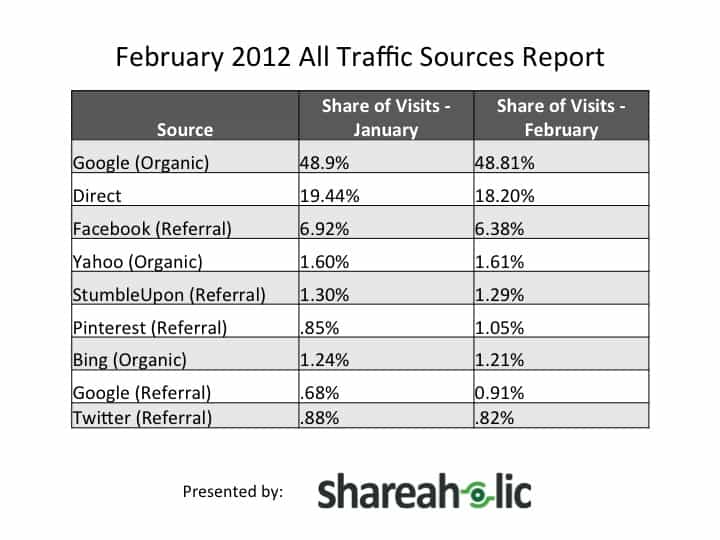
A new study by Shareaholic digs in to their February 2012 All Traffic Sources Report to find that Pinterest has surpassed Twitter for internet referral traffic.  That's amazing considering the sheer amount of traffic that passes through Twitter, how entrenched it is as a cornerstone of social media communication and how new Pinterest is - until last summer it was run out of a small apartment!

So, what does Pinterest have to do with Cloud Computing then?  Everything!  Pinterest is all about linking images in the cloud with descriptions and sharing like items together on a "board."  This allows posters to categorize and make sense of the massive amounts of information floating around in the cloud.  It's a way to make all that stuff we find through Google, Bing and Yahoo more useful... more easily digestible.


So, how am I using Pinterest?  Since I am an Office 365 Solutions Consultant at Valorem Consulting Group, I am using it to organize Office 365 data I find across the internet and on Microsoft's websites.  I'm linking screen captures of many of Office 365's interface pages, I'm embedding training and marketing videos and I'm posting up blog articles, news items and brochures.  I am then commenting on those items and linking back to them in articles such as the one you're reading right now!

Check out how I've begun using Pinterest at http://pinterest.com/quitecloudy/.


Pinterest is an important advance and a taste of what is to come... more intelligent ways to discover and consume relevant information in our ever expanding cloud of Big Data.
Enhanced by Zemanta

Wednesday, March 14, 2012

Office 365 Prices Reduced!

Microsoft announced today that they reduced the pricing for most Office 365 SKUs.  This is great news for new Office 365 customers... although there is no change for existing customers at this point.

See the sheet below for details:


Friday, March 2, 2012

Pay for Your Privacy - The Google Conundrum

How much is your privacy worth?  $10 per month?  $25 per month?  Would you just give it away for free?  All of your private data?  Information about what you like?  Your shopping lists?

Giving it away for free is exactly what you're doing when you use Google's products.  Now some people may not care all that much.  Maybe you think it's okay if Google and other big companies know everything about your online activities, but businesses and especially governments need to think again.


Image representing Google as depicted in Crunc...
Image via CrunchBase
Think this is a whole lot of to do about nothing?  The Electronic Privacy Information Center (EPIC) doesn't.  They filed suit against Google on February 8th to try to prevent Google from combining data from across Google's services in to a single profile, making all of your data available to all Google services.  In practice this means that you may see advertisements customized based upon the content of your Google searches.  You may also see advertisements when looking at your photos on Picasa based upon the contents of your e-mail or Google Talk chats.

Picture this: a friend is getting a divorce and asks you to recommend an attorney.  You do a Google search for "divorce attorney."  Later, your spouse goes to read your shared G-Mail account and is presented with a slew of advertisements for divorce attorneys.  Awkward questions ensue...

Another example with photos and instant messaging: you're having a discussion about good times at college with a buddy on Google Talk.  You mention playing drinking games and going to clubs of ill-repute.  Later that day you're sitting with your 5-year old looking at family photos on Picasa and a pop-up ad is targeted at you for Viagra (or something worse).  Mommy, what's Viagra?

privacy
privacy (Photo credit: Sean MacEntee)
So let's talk about Google Apps.  Google says that Apps' education, business and government customers are safe and that they won't use their data for advertising.  Apps isn't quite free, but it is a very low cost service.  Where is Google making their money then?  Is it from subscriptions?  Really?  I don't believe Google cares whether people use Apps or not... they're counting on creating new Google search customers.  Even if they aren't directly using the data that organizations store in Google Apps the 900 less-well regulated applications that you use when you're a Google Apps customer aren't covered by their privacy policy.  Don't tell me that Google isn't going to use information from those other apps to choose ads to display to users.

It's a slippery slope.  Get a discount on your cloud e-mail, file storage and sharing but be aware that there is still a cost for using Google's services.  It's your information... your privacy.  That's how you pay for low-cost and free services from Google.

So, am I going to stop using Google services?  This blog was published with Blogger.  I used Google search for some of the references and related articles.  I don't plan to stop any time soon either.  But am I going to trust customer's data to a company that makes 97% or more of their revenue on aggressive search advertising?

Not a chance.

Next time: is Microsoft a better choice for cloud e-mail services than Google?  See you soon!
Enhanced by Zemanta

Thursday, January 26, 2012

Are You an IT Cave Man? - Part 1: Computer Servers


Are You an IT Cave Man? - Part 1: Computer Servers

What's Ancient, Tired and Wired in IT

If you've been in a cave for the last five years you've missed some amazing advances in Information Technology.  Yes, you are now an IT Cave Man!  Most IT people know about Moore's Law (approximately every 18 months microchip density doubles - increasing computer speeds) but microchip advances are actually one of the least important stories right now.

Five years is an eternity in IT and here's what you need to get caught up.  Reader beware... this is a long, but not complete list.  It would be difficult to impossible to cover all of the various IT advances in just the last year, let alone five!  If you have a favorite tech you feel I left out and should not have please comment to let me know.

I'll tackle this task in three chunks:
  1. Computer Servers
  2. Desktops, Laptops & Mobile Devices
  3. Applications & Services
Here is what's ancient, tired and wired - Part 1: Computer Servers...

Computer Servers


Server Hardware

Servers have come a long way since 2006. Quad-core CPUs are now standard and you rarely see a server with less than 8GB RAM. Blade servers became popular and then virtual servers revolutionized the whole category when you no longer required one server for one operating system. Finally, through virtualized hosted servers - once the homes of websites and ftp servers - became popular destinations for running software applications (SaaS), started providing platforms for developing and deploying services (PaaS) and hosting entire server infrastructures for customers (IaaS).
Ancient Tired Wired
Rackmount Blade Virtual Server

Products to watch: Microsoft Hyper-V, VMware ESX

Server Operating Systems

Software and hardware advanced in lock-step with new features appearing to take advantage of the exploding CPU power, memory and storage on servers.  With Windows Server 2008, virtualization became a part of the O/S in the form of Hyper-V and tools got better and better, eventually allowing for "servers" to be virtually deployed at a whim, without configuring new hardware.  Cheap and easy virtualization from Hyper-V and VMware enabled the hosting of fully functional "servers" on the Internet, moving infrastructure offsite.  As internet speeds increased, reliability was enhanced and better tools were developed, "cloud" services began competing with on-site servers... are the days of buying Windows and owning your own servers numbered?

Ancient Tired Wired
Windows Server 2003 Windows Server 2008 Cloud

Products to watch: Amazon S3 / Microsoft Azure

Server Monitoring

Server monitoring used to be the work for system vendors like Dell, HP & IBM.  Their products are familiar to many and include OpenManage and Insight Manager.  More recently Microsoft's System Center Operations Manager (SCCM) has offered a standardized and easily accessible solution.  The latest trend however is to cloud-provided services.  Already widely used by managed IT service providers, hosted Remote Monitoring & Management (RMM) solutions provide most of the same benefits without requiring the hosting of dedicated monitoring hardware and hiring a new team of IT experts to run it.  Vendors like Level Platforms and N-able have mature products that provide onsite and hosted versions of their product suites.  They also offer integration with popular service automation platforms, e-mail and collaboration software.

Ancient Tired Wired
Alerts & Logging OpenManage, Insight Manager, Nagios,
Microsoft SCCM
Hosted RMM

Products to watch: LPI Managed Workplace, N-able N-central

Backup Systems

Storage has revolutionized the backup and disaster recovery industry.  Serial ATA hard drives combined with Serial Attached SCSI (SAS) enabled high-capacity, low-access storage that has either replaced tape backups altogether or is used in a nearline or near-online function.  This has enabled backups to occur to intermediate, relatively high-performance media and then to be later archived to tape for longer-term storage if necessary.  Often, tapes are totally removed from the system and the nearline storage becomes the primary archival medium.

Backup software has also progressed.  New technologies have enabled high-capacity storage media to store even larger amounts of data through impressive compression and now data deduplication.  Through deduplication, similar or identical data is stored only once with changes being recorded only.  In this way, two backup copies with only one bit of data changed only store the change rather than the full data set.

Combining hardware and software in appliances, companies like Datto and Zenith Infotech started selling integrated backup systems that were remotely managed and would synchronize data to the cloud for an off-site copy. While these systems have proved popular in small and medium businesses (SMB), larger enterprises need higher-capacity solutions and the cloud-synchronization of data is as of yet too slow for larger datasets.

Ancient Tired Wired
Tape, Optical Backup-to-DiskData Deduplication, Offsite Sync

Products to watch: Acronis, Datto, NetApp Syncsort, Storagecraft, Symantec

Watch in the next few days for Part 2: Desktops, Laptops, & Mobile Devices.

Tuesday, October 25, 2011

Dogfooding IT with Office 365

Have you heard the term, "eating your own dog food?"  Microsoft manager Paul Maritz wrote an e-mail in 1988 that created the term and loosely it means... use what you sell.

I took the challenge to heart a while back and decided that if I was going to sell cloud services I needed to use them myself.  This idea really took off for me with Office 365 this year.  As I started talking to more and more clients about the benefits of cloud-based e-mail I first signed up for Business Productivity Online Services (BPOS, the precursor to Office 365) and then the beta of Office 365.  I used BPOS and the beta as test beds to learn the products and to assess their viability for my clients.  I wasn't ready to migrate to them internally yet however.

Eventually, just as Office 365 was releasing my first client wanted to get moving.  I had been talking to them about it for months.  My experience with the beta had been good so we went ahead.  I signed up for the full product and started moving over e-mail at the same time I was installing it for this client and actively selling the product to my other clients.  I figured it was time to eat my own dog food.

So, here's what happened: my client had some growing pains but Office 365 has turned out to be a good solution for them; I've had several other clients express interest and installed it for them successfully; I love using it internally and am recommending it to anyone that listens.  I did learn some lessons though:
  1. Doing your research really pays off.  It did for me!  I avoided several land mines by doing a beta assessment first.
  2. The entry-level Office 365 SKU (P1) doesn't come with phone support.  It isn't worth the $4/mo savings... get the E1 SKU, you won't regret it.  There's also a 50-user cap for the P1 SKU.
  3. You cannot switch from the P1 to E1 SKU.  Tell me it ain't so!  This was a real bummer for me.  I still don't understand why.  I'm sure there's a good technical reason.  You have to do a full migration to move between these SKUs.
  4. I know Office 365 is supposed to be easier than self-hosted Exchange, but it's no cakewalk and still requires significant technical knowledge and capability.  Your average tech-savvy client isn't going to do a migration without assistance.  Some of the migration stuff gets pretty complex.  Besides, most businesses just don't *want* to do the administration.  They have other stuff to worry about... like running their business and making money.
  5. The amount of money you'll make on Office 365 (aside from ancillary services) is negligible until you get in to hundreds of  deployed licenses.  Don't plan to make your money on monthly recurring revenue.  It's a 6% share per year plus 12% if you're the initial partner of record that signs up the client.  That's a maximum of 18% the first year plus 6% per every year after.  Make your money on services, that's all I can say about it.  It's not nearly as profitable as providing a hosting service if you do that.  If you do provide hosting services plan on this being a big competitor!  Stress the customization options you offer that Office 365 does not.
  6. A properly run and well maintained Exchange server doesn't take much more work to service than Office 365.  You'll still get the bulk of your work on user adds/deletes, adding new domain names and aliases and on the user-side support of Outlook.  You just don't need to monitor the hardware any more.  Oh, and you have a new administrative interface to learn.
  7. Including Microsoft Office in your Office 365 subscription seems like a good idea and it may be for some clients that have very seasonal workforces.  Do the math before you decide on this course though.  You have other options for subscription based Microsoft Office, like Open Value Subscription and sometimes Services Provider License Agreement (SPLA).
  8. There's no private branding or resale of Office 365.  It's 100% direct bill from Microsoft.  You don't get to mark it up.  This makes it hard to include in a fully managed service agreement by the way.  Microsoft really needs to fix this to increase adoption by Managed Service Providers (MSPs).
  9. Just like any service IT WILL GO DOWN.  Make sure your clients understand that 99.9% of the possible 8,760 hours in a year equals about 9 hours per year of down time.  That's a full day and then some and it could happen at any time.  Just the same, it's likely to be much more reliable and secure than self-hosted Exchange for most small businesses and may make sense for larger ones as well.
  10. It comes with some nifty additional products you may or may not use.  Bear in mind that you don't get as much of each product with each Office 365 SKU so learn your product before you sell it.  Also, don't try to sell Lync to people using Office Communication Server as an onsite VoIP unified communications system.  There's no integration with the public communications infrastructure yet.  That means for right now it's an internal-only system.  Cool, but not blow-me-outta-the-water awesome.
I like Office 365.  I've tried Google Apps and while that worked okay, Office 365 just feels more like a business solution to me.  It's been reliable and pretty easy to set up.  Most days I don't even notice I'm not hosting my own Exchange server any more.  And isn't that the idea?  Apparently, dog food ain't so bad!

Are there any best practices with regard to Office 365 that you've found and I've missed?  How many seats do you have on Office 365 and how has it been as a profit center for your business?  Let us know with your comments!

Wednesday, October 12, 2011

IT Management Gets Cloudy

CIOs and IT managers are slowly realizing the benefits of Cloud Computing but there's still a long ways to go. Product offerings for hosted services have matured and exploded but there are so many options now that it's hard for IT management to keep up.

So, here's a quick guide to the Cloud technologies that are out there.  I've broken it out in to the three major Cloud services areas to help you better understand what's available and how:
  • IaaS (Infrastructure as a Service) or HaaS (Hardware as a Service)
  • PaaS (Platform as a Service)
  • SaaS (Software as a Service)
Infrastructure as a Service
* In a nutshell: you pay for full access to a server that someone else hosts for a monthly fee.  These services generally include some sort of terminal access to a virtual computer instance that you populate with your own operating system and software license.  Often, you'll access the server through a terminal service client of some sort. *Note: HaaS often is confused with IaaS and generally refers to on site (not Cloud) equipment provided along with support services by a service provider for a monthly fee rather than as an up front capital investment.

* Who needs it: anyone that needs full configuration capability for a server but doesn't want to actually host the server themselves.

* Benefits: host equipment so you don't need to build your own Tier-1 datacenter for access to a highly reliable and secure environment.

* Challenges: even though you have full access to the "box" your applications are deployed on the "box" may actually be a virtual server rather than a full server... limiting the configurations on the actual hosting hardware.  If you're trying to move a locally hosted server to the Cloud the performance may not be the same since your connection now goes over the internet.

* Prominent vendors/examples: Rackspace.com, Amazon Web Services, GoGrid.

Platform as a Service
* In a nutshell: highly-reliable hosted operating system software that totally obscures the hardware infrastructure. Services may be accessed through a web browser or application client of some sort.

* Who needs it: application developers that need a platform (.NET for instance) for their applications but do not require complicated customized infrastructure.  Anyone who wants their application to "scale" quickly on a fully virtualized platform without downtime for software and hardware upgrades.

* Benefits: the infrastructure disappears. You get a reliable and scalable service for a monthly fee.

* Challenges: customization of the platform may be restricted to enable broad use by many types of applications. You may not have all the options you would like. Some PaaS services do not provide all the debugging, test and development tools you'll need or may use tools you're unfamiliar with.

* Prominent vendors/examples:Amazon Beanstalk, Google AppEngine, Microsoft Windows Azure, Salesforce Force.com.

Software as a Service
* In a nutshell: perhaps the first and most recognizable of the cloud services, SaaS obscures the whole back end and simply provides a web-based application generally accessed through a web browser.

* Who needs it: anyone wanting to host a highly reliable web site or service generally accessed through a browser like Internet Explorer or Firefox.  Some applications may be quite complex and may even interface with hosted databases and other web services but require no access to the underlying operating system or hardware on their own.

* Benefits: the cheapest and least complex platform and also the easiest to develop for.  Applications can be deployed very quickly.

* Challenges: configuration options are often accessed through a web console and are limited in scope.

* Prominent vendors/examples: SalesForce.com (main CRM app), 1&1 Website Hosting, Carbonite Backup.


There's something for everyone in Cloud computing.  With so many options, the question is not whether you need Cloud computing any more, but WHERE you need Cloud computing.  Many companies are taking baby steps in to the technology through obvious Cloud computing targets like hosted e-mail and CRM.  Especially small and medium sized companies that have difficulty investing capital in secure, highly reliable onsite infrastructure will be interested in the opportunities that Cloud computing presents.

Even large enterprises can find Cloud computing synergies.  How powerful would it be to pay a monthly fee for an application you don't need to deploy across hundreds or even thousands of desktops?  Wouldn't it be nice to simply deploy a shortcut to a hosted application instead?  There would be no need for internal development and no need for additional help desk resources.

If you're a CIO or IT manager, do yourself a favor.  Get educated and get moving.  The Cloud is here like it or not.

Wednesday, June 8, 2011

Rebranding my Blog

This morning I was reviewing my blog after posting the update about mobile computing yesterday and I realized... I haven't been posting about any topics aside from mobile and cloud computing for months now.  I like these two subjects and I find that there is lots to talk about that is relevant not just to technical people but to end users and decision makers.

So, I've decided that Consulting Notes is no longer an appropriate title for the blog.  To reflect the content that dominates my articles I have changed the name to "Cloud Notes by Scott Cameron."  I apologize for any confusion this may create for existing readers.  The old content is still here for those that want it, I'm just not going to focus on delivering content for consultants and IT providers any more.  Many of the topics I cover will be of interest to them I am sure, however.

The focus of my content will for the most part be on mobile and cloud computing topics.  I will try to use non-technical language as much as possible to make the content accessible to those not in the IT industry.  That doesn't mean there won't be some good technical nuggets in there as well, though.  I hope you find the topics I cover illuminating and am looking forward to a good discussion.

Thanks for reading!

Tuesday, June 7, 2011

Smartphones, Tablets and All Things Mobile

I was recently asked "What's the one hot technology to watch in 2011?" and my response was immediate: Mobile devices without a doubt.

The explosion of new form factors for mobile computing is staggering to behold. Smartphones and tablets are changing the face of information technology.  New devices are released monthly and highly anticipated by users.  Owners of mobile devices fanatically scour the app stores for good deals on the highest rated apps.  Services ranging from Netflix access, to CRM software, to electronic medical records (EMR) are revolutionizing how and more importantly WHERE we access and interact with our digital lives.  When combined with cloud-based Software-as-a-Service (SaaS) the possibilities are staggering.

Smartphones have been a challenge for the enterprise for several years now. Starting with the Blackberry and then moving through Windows Mobile, Apple ios and now Google Android, end-users are demanding mobile access to corporate resources with their personal equipment and businesses are being forced to support them. It's not just rank and file information workers either, executives have bought in to the productivity gains to be had by delivering high-quality mobile products on the smartphone platform. And most everyone agrees... mobile is just plain fun.

Regarding tablets, some consider them just a larger form factor smartphone, but they're only partly right. Many consider them mainly entertainment devices, but that's only the start. Tablet computers (iPad and now Android and maybe Microsoft Windows 8 and the Playbook) are a new type of device with many of the capabilities of a full desktop or notebook computer, but that run an embedded "system on a chip." This category of device is changing how operating systems are developed and delivered. Trying to understand how having a single-chip appliance with all of the capabilities of a desktop computer will change information technology is going to be a full time occupation for R&D analysts for the next several years.

Mobile technologies are the place to watch this year. They're rapidly maturing after being in the marketplace for several years now. Businesses are in the process of determining how they can harness their capabilities and as we see new products come to market that take full advantage of the mobility that we've been granted by them there's going to be a massive change in how people interact with their information technology systems.

For a taste of how "hot" mobile is check out the articles linked here:
1. This cnet article mentions that almost 20 BILLION apps have been downloaded from the Apple and Google marketplaces. Apple developers alone have made over $4.5 billion since the release of the Apple App Store in 2008.
2. Susan Fogerty at TechTarget wrote a great article about the surging popularity of tablets today. According to their research, tablets lead even smartphones as the mobile technology of choice for 2011. Both technologies far outstrip traditional notebook computers in their survey.
3. Gartner analyzes tablet use in the enterprise in the final link. Gartner says that tablets are neither "better laptops" nor "better smartphones" but will compliment and enhance both.

Keep your eyes on mobile technologies in 2011 and 2012 and you won't be disappointed.

Links:

Tuesday, May 17, 2011

The Small & Medium Business Case for Office 365

The Small & Medium Business Case for Office 365 - An Evaluation of Microsoft's Cloud E-mail and Collaboration Services
For some background on Office 365 see my previous post http://blog.redwoodnetworks.com/2011/04/what-makes-sense-in-cloud-today.html.  I'll assume that everyone is passing familiar with hosted e-mail and collaboration services for the purposes of this article though.

Like Punxsutawney Phil, the economy saw its shadow in 2010 and returned to its hole for another 6 weeks (months) of winter.  Spring is here now, though.  Businesses are spending money and hiring again and they've learned a few things.  First of all, they're a little more cautious... especially with regards to technology and purchasing systems that require a great deal of ongoing maintenance.  They continue to be interested in new ways of doing more with less.  What's new, though, is that they are willing to take some calculated risks, give some new ideas a try.

I'm going to make some generalizations about businesses... see if any of this sounds like your business:
  1. You have limited capital assets to invest on computer technology, software and services.
  2. You need to keep up with technology trends within reason... to keep in line with vendors, partners, clients, etc.
  3. You require solutions that are reliable, business tested, and easy to manage.
  4. You have one or more in house computer servers now providing e-mail and collaboration services.
  5. Your organization includes several people that require the ability to not only send e-mail but to collaborate with each other and external users efficiently.
  6. You've delayed renewing your systems for the last couple years due to the recession but you just can't wait any more. Your systems are aging and it's just time to upgrade.

Does any of this sound familiar?  If so, this is a great time for you to evaluate some of the maturing solutions for hosted e-mail and collaboration services.  Small and medium-sized business have had it hammered in to their heads over the last 10 years that they can now do all the things that large businesses can do with technology:  they can have their own e-mail; they can have web portals, not just plain old websites; they can host web training and deliver presentations to hundreds remotely; they can have instant messaging and unified communications systems that deliver voicemail messages to their e-mail inboxes.

There's a problem though.  All of these solutions require a LOT of maintenance.  And experts to maintain them.  Not to mention that the solutions themselves are not cheap.  They're much more affordable than they used to be, but it's still hard to part with capital.  Didn't we just have a recession?  And are we really SURE it's done?  How can businesses take advantage of all of these technologies that extend productivity and give critical advantages over competition... but do it without the large investments and risky baggage they come with?

Well, they're in luck.  If you really have been hiding in a hole for the last 3 or 4 years you've missed a revolution in computer technology.  It's called Cloud Computing and Microsoft is there in spades with their new Office 365 product.  When I say new though, don't get the wrong idea.  This is not a version 1 product.  Hosted e-mail and collaboration services have been around for several years now.

Back to the business case for Office 365 then.  Let's talk about some of the reasons why businesses have NOT been moving in droves to hosted cloud services up to now.

-------------------------------------------------------------------------------------------------
Road Block #1: The Solutions are Just Not Mature.
Your business cannot depend on a hosted service you cannot control.  Hosted solutions aren't reliable and are probably not secure.  Also, the service level agreements are not sufficient and they're just not ready for prime time.

What's Changed?
Microsoft deployed its first hosted Exchange e-mail service (the 1.0 product) in 2002, re-released it in 2006 (Exchange Hosted Services - the 2.0 product) and expanded it to include the collaboration product Sharepoint 2007 (Exchange and Sharepoint Online - the 3.0 product), finally reaching the current product - Business Productivity Online Services (or BPOS - the 4.0 product) in November 2008.  Office 365 is expected to release fully in the US around mid-year 2011.

So, if you look at the full history of hosted Microsoft online services, Office 365 is most definitely NOT a version 1 or even version 2 product. It's a mature and well-thought-out suite of services with offerings that are appealing to a broad range of business types and sizes. With everyone's concern (often for good reason) over trying version 1 products it's important to understand just how mature hosted "cloud" services have become over the last 5 years.

Road Block #2: Access to Adequate Internet Connections
Up until recently, many small businesses struggled with obtaining reliable and speedy internet service.  This kept them from considering hosted solutions because of the perceived low quality of those services.

What's Changed?
With the expansion of cable companies in to the business space and the resulting innovation by the phone companies, small businesses now have extraordinary options for high-speed, reliable internet services.  T1?  Old news.  Got fiber?  No?  Check it out.

Road Block #3: Didn't We Buy that Last Year?
Pre-existing investments by medium-sized businesses in some of the very technologies being moved to the cloud have kept them from fully investigating outsourcing those services.  There's a lot of infrastructure that was purchased to enable some of these solutions and you can't just throw it away!

Microsoft Office Communications (OCS) server and Sharepoint have both experienced a renaissance in medium businesses over the last 5 years.  Integration of phone systems with OCSSharepoint has become a major productivity tool on par with e-mail in many offices.

What's Changed?
Many of these investments are now aging.  Staff has been downsized during the recession.  Businesses want to keep these capabilities but do it with less staff and capital investment in infrastructure that needs refreshing every three to five years.  The online solutions have matured and now offer many if not all of the same features as their more traditional cousins.  If it's time for a tech refresh, it's time for an online services evaluation!
-------------------------------------------------------------------------------------------------

So, with most of the major road blocks removed, why haven't businesses been moving to the cloud in droves?  Expertise.  The industry requires a new generation of consultants and engineers that specialize in Cloud Infrastructure Services.  They're coming, believe me.  Those who see the writing on the wall are already well in to delivering these services to their clients, but full penetration will take some time yet.  There is a fundamental shift in how Information Technology is delivered.  Microsoft calls it "Software Plus Services."  You won't see onsite computer servers, software and services disappear from businesses entirely, at least not for a long while.  But, the slow movement of services to the cloud has begun and will only accelerate.

Back to the business case again then.  You can now:
  • Pay for your e-mail, collaboration portal, instant messaging, and meeting/web conferencing solutions via a monthly subscription that is a true expense and saves you from calculating depreciation of assets.
  • Obtain all of these services without a major capital investment.
  • Bring capabilities that only large enterprises previously had available to small and medium businesses quickly and easily.
  • Future-proof your technology - don't invest in new technology that will be obsolete again within 5 years.  These services include all upgrades - performed invisibly in the background and without major interruptions (mostly) in service.
  • Access services from anywhere - it's incredibly easy now to open a new office.  Who cares about connecting to the servers in your old office, it's all hosted online!
  • Access more and better solutions - the rate of development for new applications, services and solutions on the web is much faster than the traditional model.  A company can create a product and have it deployed to customers overnight now.  React faster with more relevant solutions than ever before.
  • Right-size your solutions.  Need more seats?  Add them and they're available within minutes.  Downsize?  Remove some seats and pay less next month.  This is an absolute revelation to seasonal businesses.
How much does all this cost?  An arm and a leg, right?  Not at all!  The entry level product with 99.9% guaranteed uptime and limited support is available for only $6 per user per month.  For larger businesses with more substantial needs or those with higher SLA requirements there are solutions that range in price up to $27 per user per month.  The upper-level options also include a license of Microsoft Office Professional Plus for each user.  This is yet another way to move a capital expenditure in to the expense category.

So, while not every "cloud" offering is worth evaluating, the Microsoft Office 365 services coming to market in the next several months are mature services worth a hard look by small and medium-sized businesses.  Cloud services are ready and they're here.  You should be actively looking at them and figuring out how they will change your business.  You can be sure that your competitors are.

Credit for the history of Office 365 goes to Zdnet's Mary Jo Foley's blog: The road to Microsoft Office 365: The past.

Monday, April 4, 2011

A Taste of the Cloud

For those who don't know what's possible with mobile computing and cloud services I thought I'd do a little analysis of which core business functions you can provide to highly mobile people.

If you are in and out of the office but need to have full access to everything regardless of where you are, now is a good time for you. Here are some of the top services companies use and examples of how you can take them on the road:
  1. E-mail - open up your Microsoft Outlook program sitting in the office, at Starbucks, on the road in a hotel over their wifi.  It works the same no matter where you are.  Just use it the way you always have.  Simple.  Easy.  Powerful.
  2. Mobile - get your e-mail on your phone.  Get your calendar and contacts too.  It's all synchronized over the internet with your corporate e-mail system.  Lose your phone? Securely wipe its memory remotely, get another one and resync.  All of your data is right back on the new phone in minutes.  Access your apps from your phone too if they're compatible - and more of them are every day.
  3. CRM - much like e-mail, you can access it from anywhere.  Some CRM apps are 100% web based, but others are increasingly designed to work over the internet with their central servers hosted in the cloud.
  4. ERP - if it's web-enabled it's easy to access your ERP from anywhere, and many of them are now.  Even those that aren't web-enabled are easy to set up for remote access with technology like Remote Desktop Services that is included with Microsoft Windows Server 2008 and later.  You click an icon on your desktop, are prompted for your logon, and the app pops up just like it does in the office.  You can even print to a local printer if you like without fighting device drivers.
What's a day like in a technology-enabled small business owner's life?  In the following example, John is the owner of Nebraska Widget Company (NWC):
6:00 AM
The alarm on John's phone goes off and first reads (yes, speaks aloud!) him today's weather forecast and then lists his appointments for the day.  He hits the snooze button and it reminds him again in 10 minutes but this time plays some music from his collection so he can listen while getting ready for the day.
8:00 AM
John meets some fellow business owners for breakfast at a networking meeting.  He has a couple leads to share and instead of passing around business cards, he pulls up the contact on his phone, bumps the phone against his friend's phone and the contact is automatically transferred.
8:30 AM
While at the meeting John gets a call from the office.  He needs to approve a contract for a new client that wants to order some widgets and if he waits until he can get to the office he'll lose the contract.  John turns on his tablet computer, brings up his e-mail in Outlook, gives it a minute to sync on-line and then checks for the important e-mail with the contract.  He clicks a link in the e-mail which brings him to a web page where he can review and e-sign the contract.  He does so and the application generates signed PDF copies for both him and the client and delivers it to them by e-mail.  He wirelessly sends the PDF to his portable printer so he can hand a physical copy to his new client later.
10:00 AM
John drives to the new client's office... the one he just signed the contract for.  He has never been to this office, just his sales staff, but he wants to close the deal in person.  He needs directions.  He presses the listen button on his phone and tells it "Navigate to ACME Block Company."  The phone uses his GPS in combination with his e-mail contact list to look up and give him turn-by-turn spoken directions to the client's office.  He signs the deal, shakes hands, never calling the office for help.
12:00 PM Lunch
Since he has been busy all day, John hasn't had a chance to keep up with the news.  There's a big merger going down with one of his clients in Texas.  John is in Nebraska.  He wants to listen to the local news radio show in Texas though.  No problem, he connects his wireless stereo Bluetooth headphones to the phone, starts his world radio app and then selects the right station in Texas.  He listens to the broadcast streamed over the internet while he eats.
1:00 PM
John goes in to the office, docks his tablet computer so it can charge and plugs in his phone so it can too.  He checks in with his admin person and she has already processed the contract he signed, sent the order for processing and submitted it to the billing department.
1:30 PM
Wondering how the new order for widgets is coming along he opens up his corporate dashboard in his internet browser.  The dashboard has several tabs across the top and on the front page lists important and recent items.  The order for his new client is listed at the top of the recent item list.  He clicks the item and the reviews the status page, verifying the right number and type of widgets.  He clicks the "Verified" button and the status changes to show that the order has been verified.  The order is forwarded for payment to the billing department and is processed to his client's credit card within minutes.  The order status then changes to "Shipping".
2:00 PM
John has a sales meeting with his staff.  They sit down, pull up the company dashboard on a projector screen and review their pipeline.  The CRM program they use ties in and all the sales execs record their opportunities and wins in it.  He does a simple sort of open opportunities and identifies some key items for his staff to concentrate on using charts and graphs that are all generated on the fly with live CRM and ERP data.
3:00 PM
An e-mail comes in notifying John that the widget order has been completed, shipped and billed.  A notification has also been sent to the client letting them know the status.  Their e-mail includes a survey to be returned, however.
4:00 PM
John receives another e-mail.  It's the survey results from his client.  In the 3 key areas of responsiveness, value and service the client scored them with top marks.  John clicks a link in the e-mail approving the survey.  The survey is tabulated in the system automatically and pushed live out to the NWC web site where it appears in the "Recent Wins" section on the front page.
5:00 PM
John packs up and heads home to get caught up on some e-mail and review the latest numbers from the billing department.  He opens up his tablet computer out on the deck and connects wirelessly in to the corporate server with a single click.

All of this and more is possible with the right technology and the right partners.

What Makes Sense in the Cloud - TODAY

So it's been a while since I talked about why you might not want to jump in to the cloud yet. Let's talk about why now is a great time to get your feet wet.

Cloud services have matured and the product offerings in the marketplace have really come a long way in the last 24 months. In 2009 we had the bare beginnings of cloud services and the only real mainstream services were Salesforce, Google Apps and some mail applications (Yahoo, Google, Hotmail, etc.) Since then the options have EXPLODED and we're already on version 2 or later of some of the more prominent ones.

If your organization uses Exchange e-mail but has less than 100 users you might be very interested now in Microsoft Business Productivity Online Services (BPOS). For a fixed, low, monthly fee per user you get the full functionality of Exchange - hosted in the cloud. The experience is almost identical to the end user. A short and easy migration gets you off your old Small Business Server or Exchange server and you're now a highly-mobile fully-functional mail user.

Microsoft will be releasing their upgraded version of BPOS in the next few months. It's being re-branded as Office 365 and they are expanding the products offered along with it. For instance, you can now purchase hosted Exchange (and get Sharepoint for collaboration, Lync for instant messaging and presence, and LiveMeeting for group training/presentations) for $6 per user per month. If you don't have the latest version of Microsoft Office on your computer and would like it too you can pay $24 per month per user.

So, now you can rapidly turn up and down the number of e-mail boxes and even the number of Office licenses you're paying for. Those Office licenses are $399+ each if you buy them up front and you pay for them regardless of whether you use them or not!

Take it a step further... you can now rent workstations or laptops (and servers!) with an included service agreement... and without going through financing... from many I.T. service shops. You've been doing this with mobile phones for a while, and lately you've seen it in printers. You choose a level of service you want, sign up for a contract term and the hardware is included. Many of these services allow you to increase and decrease the number of machines as needed.

So, scale up your number of computers and all the software required as needed. If you cut down on staff you're not stuck with the equipment and software investment... simply return it and stop paying for the unused items.

You can purchase many items this way: printers, computers, MS Office software, antivirus software, e-mail services, ERP applications, accounting software, CRM software... the list goes on and on. If you have a savvy trusted advisor talk to them about what options make sense for you. You'll want to have an analysis of the services done and compare the cost of hosting the applications and hardware yourself to the cost of outsourcing. Get a full proposal and shop it to make sure you're getting the best deal with the right combination of hardware, software and services.

So, back to the original question: What Makes Sense in the Cloud Today?

The answer is... everything that makes sense. Do your homework. If you can push it to the cloud and maintain your quality of service while decreasing costs get to it!

Monday, July 5, 2010

Reasons to keep your servers out of the Cloud

I just read about a service "Doyenz ShadowCloud" that talks about taking a virtual copy of your onsite Windows Small Business Server each day and putting it in the "cloud." From there you can use it as a backup in case your server goes down. It looks like you might just be able to run from it in the cloud also.

While services like this are becoming more popular I reserve my judgment as to whether they're really a good idea or not for anything but the backup. I think it's a good idea to have a backup and even to having a backup server hosted offsite you could use temporarily. But as to whether you'd want to use one as your primary server or not I just don't think so... at least not yet.

There will always be a blend of onsite and offsite IT services for my clients. As internet access to offsite services gets better, clients will use more and more of them. But, at least for now, I can think of a lot of good reasons to KEEP YOUR SERVERS.

Here they are:
1. Performance - accessing your data over a remote connection is just SLOWER. There are expensive technologies that promise to accelerate access to applications hosted remotely, but they're really out of reach for small businesses for the most part.
2. Ease of Use - when you connect to a remotely hosted service often you need to start a VPN. A VPN is an encrypted data connection between your computer and the server. This is necessary so that your data isn't easily available to everyone on the internet and ensures that only those that should have access are able to connect to your server. The downside is that A. You have to "connect" the VPN by clicking a button and typing in a username and password; and B. Your data is encrypted and decrypted at each end... causing a delay in accessing your data and making for a slower user experience (see #1, above).
3. Control/security - if you have a server in your office you can put it in a locked room or closet and know that the only way someone can get to it (physically) is if they open that door. While we are told that hosted systems in the cloud have big datacenter security, you generally don't know who is accessing your system and you may not even really know where it is. Theoretically it's unnecessary to know where your stuff is, but I'm a little old fashioned in that way I guess. I'd at least like a COPY of my stuff just in case something happens to that datacenter I've never actually visited in person.
4. Flexibility - when you put your systems in the cloud you generally lose the ability to customize the software on them. You also lose some physical things like the ability to hook up a hardware access/license key dongle if you have an application that requires one.

So, there are lots of reasons to keep your servers. In most cases, I'm going to recommend that my clients don't move 100% in to the cloud. It's just not ready. But, in some very specific instances it makes a lot of sense. And having some of your services in the cloud now is all but inevitable.

Next time I'll talk about when I *do* recommend businesses move to the cloud and for what parts of their Information Technology.

Wednesday, May 5, 2010

Reasons to Keep Your Servers

Next up... with all the great reasons to move in to the cloud, why would anyone want to host their own server any more?

Stay tuned...

Why Move to the Cloud?

The primary reason most companies move operations in to the cloud is... MONEY.

In the traditional way, a company needing a new e-mail server would:
1. Buy a new server ($3,000 - a relatively inexpensive one)
2. Buy an operating system and the e-mail software ($2,000 - Windows Server & Exchange)
3. Pay employees or consultant (15 hours or around $2,000) to install the whole thing

That's a capital outlay of $7,000. It's likely that server will need over the course of a 4 year lifespan:
1. $2,000+ in electricity and cooling
2. Hardware and software labor services up to 4x the cost of the server (say $6,000)
3. Hardware upgrades and replacement ($500 for misc components probably after 3-year warranty expires)

If you consider the total cost of owning that server over the course of 4 years then, the total is $15,500 for one single server.

Let's just say that e-mail server was going to host 30 e-mail mailboxes and do nothing else. You can purchase as a service in the cloud the very same e-mail solution for $10 per month per user. For 30 users thats $300 per month or $3,600 per year or $14,400 for 4 years.

You just saved over $1,000. You'll probably get more for your money too. Consider that:
1. Your server will be hosted in a Tier 1 data center with redundant power systems. It'll most likely be up more when hosted than if you keep it onsite.
2. They'll provide backups which might cost you $1,000 or more to just purchase software for, let alone maintaining the system for 4 years.
3. You'll get highly trained engineers that are pros at keeping servers running 24/7 and that's all they do. This will include monitoring of systems, patch management, etc.
4. You have a monthly expense rather than a capital outlay. That means you get to deduct the business expense on taxes rather than tracking depreciation.
5. The service will always be on the latest version of the software. No upgrades for you to manage.
6. You can add more mailboxes as needed and remove them when you don't need them. Never pay for more than you need.

Rinse and repeat. Every four years you save your $1,000+ when you continue to use the cloud rather than buy a new server.

What is Cloud Computing?

Let's start with a definition from Wikipedia:

"Cloud Computing is Internet-based computing, whereby shared resources, software and information are provided to computers and other devices on-demand, like a public utility."

Now I'll break it down into something a little easier to wrap your brain around:
Any computing service you use that doesn't live on a traditional computer server in your office is probably "Cloud Computing."

Many companies use an e-mail filtering service that removes spam and viruses before delivering that e-mail to employee inboxes. That's cloud computing.

Some companies now send a copy of their data backups to the internet for offsite storage. That's cloud computing.

A recent popular example of cloud computing is Salesforce.com, a customer relationship management (CRM) application you access through a web browser. You could also consider Facebook a cloud computing application.

There are a couple different levels of cloud computing:
1. Applications (Facebook, Salesforce, Hotmail, etc.)
2. Platforms (places for people to build applications and not put them on their own servers)
3. Infrastructure (replacing or augmenting your own servers or networking equipment with some in the cloud)

For the purpose of this discussion we'll really just concentrate on applications and infrastrcture. We'll let people who do computer programming worry about the platforms for now.

The "Cloud" and Your Business

What is the "Cloud" and how will it affect your business? You may be using the cloud right now and just not know it. What's available, what's good and what are your peers doing?

In this series of posts I'll be starting off with some general information on the "Cloud" and how Redwood's clients are using it now. We'll move on to where I (and the industry) see it going in the next couple years. If you're not already using something in the cloud now I'd be surprised and you'll be doing a lot more there very soon!
Related Posts Plugin for WordPress, Blogger...